I submitted my Chrome extension to the Chrome Web Store. A few days later, the rejection email arrived. The reason: “remotely hosted code.”
The problem? I couldn’t find the offending code anywhere in my source files.
The Rejection
The Chrome Web Store review team flagged my extension under Manifest V3’s policy against remotely hosted code. The rejection email was specific. It pointed to a URL inside assets/sidepanel.js:
cdnjs.cloudflare.com/ajax/libs/pdfobject/2.3.0/pdfobject.min.jsMy first reaction: I didn’t put that there.
I opened my source directory and ran grep:
$ grep -r "cdnjs" src/
# No results

$ grep -r "pdfobject" src/
# No results

$ grep -r "cloudflare" src/
# No results
Nothing. Zero matches. The URL the reviewer flagged didn’t exist anywhere in my source code. But it was clearly in the build output, because the reviewer could see it.
I started calling these ghost URLs: strings that only exist in your build artifacts, injected by a dependency you may not even know you’re using.
How a Ghost URL Gets Into Your Build
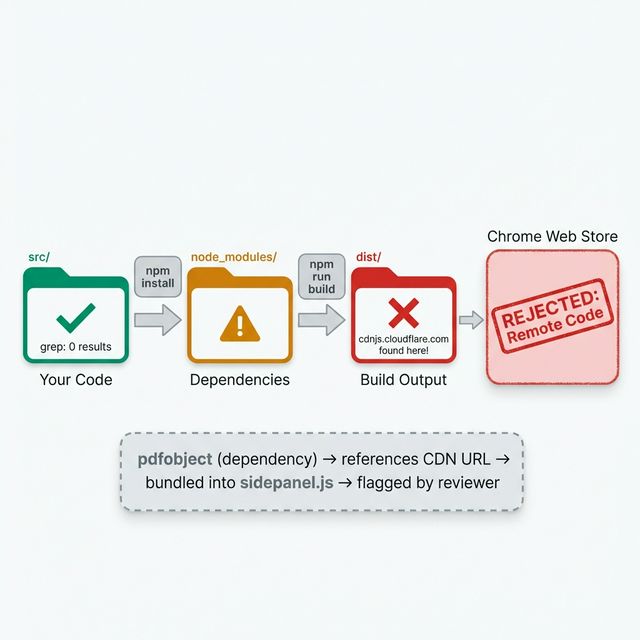
Straightforward once you see it, but invisible if you only look at your source files:
- You install a dependency (directly or transitively).
- That dependency’s source code contains a URL. Maybe a CDN fallback, a documentation link, or an optional loader.
- Your build tool bundles that dependency’s source into your output.
- The URL is now in your
dist/folder as a string literal in the bundled JavaScript. - Chrome Web Store’s review scans the output, finds the URL, rejects you.
In my case, the dependency was pdfobject. It referenced its own CDN-hosted version as a fallback URL in the source. I was using pdfobjectto render PDFs in the side panel — but the library’s source code contained a reference to its own CDN distribution. My bundler faithfully included that string.
Tracing the Ghost
Once I understood the pattern, finding the culprit was mechanical:
# Step 1: Search the build output, not the source
$ grep -r "cdnjs" dist/
dist/assets/sidepanel.js:...cdnjs.cloudflare.com/ajax/libs/pdfobject...

# Step 2: Find which dependency owns this string
$ grep -r "cdnjs" node_modules/ --include="*.js" -l
node_modules/pdfobject/pdfobject.js

# Step 3: Look at the actual line
$ grep -n "cdnjs" node_modules/pdfobject/pdfobject.js
# Line 42: a URL string pointing to the CDN version
Three commands, under 30 seconds. The mystery was solved.
That’s the whole trick: grep your dist/ folder, not your src/ folder. Your source is irrelevant to the reviewer. They only see the build output.
The Fix: Localize the Dependency
Manifest V3’s policy is clear: no remotely hosted code. The URL in my build output technically wasn’t executable code — it was a string literal referencing a CDN. But the reviewer doesn’t make that distinction. If it looks like a remote code URL, it gets flagged.
Two options:
- Remove the dependency — Not viable. I needed PDF rendering.
- Localize the library — Download the file, bundle it locally, remove the CDN reference.
I went with option 2:
# Download pdfobject locally
$ curl -o public/libs/pdfobject.min.js \
  https://cdnjs.cloudflare.com/ajax/libs/pdfobject/2.3.0/pdfobject.min.js

# Update the import to use the local copy instead of the npm package
# In sidepanel.ts:
- import PDFObject from 'pdfobject';
+ const PDFObject = await import(chrome.runtime.getURL('libs/pdfobject.min.js'));
Then the critical verification step:
# Rebuild
$ npm run build

# Verify the CDN URL is gone from the output
$ grep -r "cdnjs" dist/
# No results ✓

# Double check — search for ANY external URLs
$ grep -rE "https?://" dist/ --include="*.js" | grep -v "chrome-extension://" | grep -v "chrome://"
# Review each match manually
That last command became part of my permanent pre-submission checklist: scan all external URLs in the build output, not just the one that got flagged.
What the Reviewer Actually Sees
Something I didn’t fully appreciate until this rejection: the Chrome Web Store review process doesn’t look at your source code. It looks at your submitted zip file. That zip contains your dist/ output — minified, bundled, with all dependencies inlined.
This means:
- Your clean, well-organized
src/is irrelevant to the review - Comments inside dependencies get bundled into the output
- URL strings in dependencies get bundled into the output
- Even documentation links inside dependency source code can trigger a flag
The reviewer runs automated scans. If a string matches a URL pattern and it’s not on an allowlist, it gets flagged. No human judgment about whether the URL is “just a comment.” Flagged regardless.
Your Pre-Submission Checklist
This is what I run before every Chrome Web Store submission now:
- Build fresh.
rm -rf dist && npm run build - Scan for external URLs.
grep -rE "https?://" dist/ --include="*.js" - Review each URL. Is it a CDN? A remote script? An API endpoint you control?
- Check
manifest.jsonpermissions. Only request permissions you actively use. - Test the zip. Unzip in a temp folder, load as unpacked extension, full smoke test.
- Search for your own URLs. Make sure
content_security_policydoesn’t reference domains you don’t need.
Steps 2 and 3 would have caught my rejection before submission. The 30 seconds of grepping would have saved me a week of waiting for review, getting rejected, fixing, and resubmitting.
Lessons
Your build output is the truth. Not your source code, not your intentions, not what you think the dependency does. The reviewer sees the output. You need to see it too.
Dependencies carry baggage. Even small, single-purpose libraries can contain URL strings, CDN references, or external resource links that trigger automated review flags. Audit what goes into your bundle.
Localization is the safest fix. Rather than arguing about whether a URL is “really” remote code, download the file and bundle it locally. It removes the ambiguity entirely.
This rejection led me to build a more disciplined verification workflow. I wrote about it in the Checkpoint Loop article. If I had been grepping my dist/ folder after every build, this would never have made it to submission.
Next up: how my AI coding agent broke manifest.json while trying to fix this rejection — and the three-gate verification system I built to prevent it.