I shipped a Chrome extension, ChatShuttle, as a solo founder. No team. No dedicated QA. Just me and an AI coding agent, going back and forth in the terminal for weeks.
This is a build log. Not a rant about AI being useless, not a hype piece about 10x productivity. Just the practical stuff nobody writes about: how you structure commands, when you stop trusting the agent, and why you need rollback discipline.
The Reality of AI Pair Programming
You open a file. You describe a change. The agent generates code. Sometimes it’s great. Sometimes it silently breaks three other files while “fixing” the one you pointed at.
What separates a productive session from a disaster isn’t the AI’s ability. It’s your workflow around it.
After weeks of shipping real features this way, I settled on a system I call the Checkpoint Loop.
The Checkpoint Loop
Every interaction with the AI agent follows the same four steps:
- Scope the change. One file, one function, one behavior at a time.
- Let the agent execute. Watch it work, don’t interrupt.
- Verify immediately. Build, grep, test, visually check.
- Commit or rollback. No middle ground.
That’s it. The entire framework. But each step has nuance that took me real mistakes to learn.
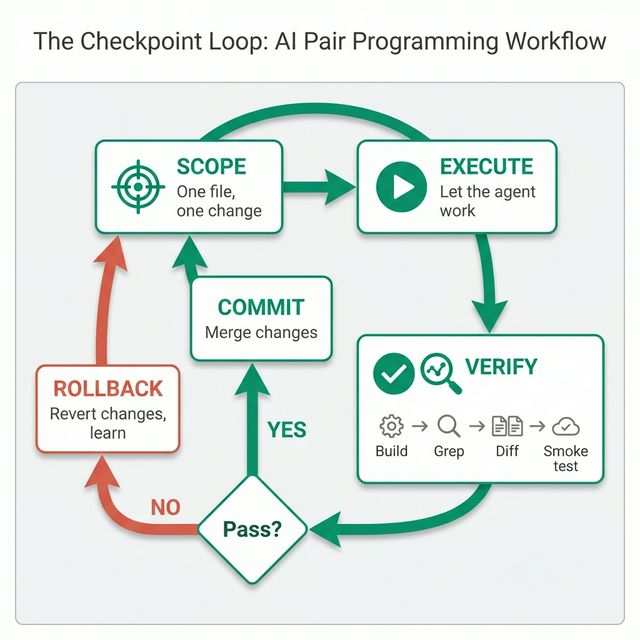
Step 1: Minimum-Viable Changes
The single biggest lesson: never give the agent a multi-file PR. When I first started, I’d describe a feature and let the agent touch 5-10 files. The result? A tangled diff where one change depended on another, and rolling back any part meant rolling back everything.
Now I scope every request to the smallest possible unit:
# Bad: "Add OAuth sign-in with Google, update the manifest,
#        and add a sidebar button for it"

# Good: "In manifest.json, add the 'identity' permission.
#        Change nothing else."
One file. One change. If the agent starts suggesting “while we’re at it, let me also update...” that’s exactly when I stop it.
Step 2: Let It Execute, But Watch
This sounds obvious, but it’s not. The temptation is to jump in mid-edit, correct the agent, and create a confusing back-and-forth. I learned to let the agent finish its attempt completely, then evaluate the result as a whole.
The exception: if the agent starts editing a file I didn’t ask it to touch, I stop immediately. Scope creep from an AI agent is real and dangerous.
Step 3: Verify Everything, Trust Nothing
Most people skip this. After every agent change, I run the same four checks:
# 1. Does it build?
npm run build

# 2. Is the change actually in the output?
grep -r "identity" dist/manifest.json

# 3. Did anything else change unexpectedly?
git diff --stat

# 4. Smoke test — does the extension still load?
# Load unpacked in chrome://extensions, click through core flows
That grep step is critical. I had a case where the agent said “Done, I’ve updated the manifest” — but the build output didn’t have the change. The agent had edited a comment, not the actual permission array. Without grepping the output, I would have submitted a broken build to Chrome Web Store review and lost a week.
Step 4: Commit or Rollback — No Halfway
This is the discipline that saves you. After verification:
- It works? →
git add -A && git commit -m "feat: add identity permission" - It doesn’t? →
git checkout -- .
No “let me try to fix the fix.” No partial commits. Rolling back isn’t failure. It’s the fastest path to trying a different approach with a clean state.
I made the mistake of chaining fixes exactly once. The agent broke my manifest.json structure, I asked it to fix the structure, it removed the permissions key entirely, I asked it to add permissions back, and it added the wrong ones. Three layers of fixes on top of a broken foundation. I lost an afternoon.
A clean rollback and a fresh attempt would have taken 5 minutes.
Three Real Examples
1. The Ghost URL
Chrome Web Store rejected my extension for “remotely hosted code.” The rejection pointed to a CDN URL in my build output: cdnjs.cloudflare.com/ajax/libs/pdfobject. I grepped my source code — nothing. The URL only existed in the build artifacts, injected by a dependency I didn’t even know referenced an external URL.
The checkpoint loop caught this: Step 3 (verify the output) would have flagged it before submission. I didn’t run it that time because I was “just packaging, not changing code.” Lesson learned.
2. The Silent JSON Break
During a fix for the rejection above, the AI agent used a replace operation on manifest.json. It removed the permissions key entirely instead of just removing one permission. The JSON was still valid — no syntax error, no build failure. But the extension couldn’t function without its permissions.
Step 3’s git diff --stat showed manifest.json changed far more lines than expected. That was the red flag.
3. The Platform Trap
I needed to patch a dependency (jspdf) using a postinstall script with sed. The agent wrote a sed -i command that worked on Linux but silently failed on macOS (different sed syntax). The “patch” looked like it ran successfully — no errors — but the file was unchanged.
Step 3 again: grep the actual output file to confirm the patch landed. Don’t trust the command exit code.
The Framework: Your AI Pair Programming Checklist
What you can take away and use tomorrow:
- One file, one change. Never let the agent touch multiple files in one go.
- Build after every change. Catch breakage immediately, not 5 changes later.
- Grep the output, not the source. The build artifact is the truth.
- Check
git diff --stat. If more files changed than expected, something is wrong. - Commit or rollback, never chain fixes. A clean state is worth more than a half-fixed one.
- Don’t trust “Done.” The agent will confidently tell you it fixed something it didn’t touch.
Why This Matters for Solo Builders
When you’re building alone, there’s no second pair of eyes. No code review. No QA team. The AI agent is the closest thing you have to a collaborator, but it doesn’t have memory across sessions, doesn’t understand your overall architecture, and will confidently do the wrong thing.
The checkpoint loop isn’t about not trusting AI. It’s about building a safety net that lets you move fast because you can always roll back to a known-good state.
I used this workflow to ship ChatShuttle through Chrome Web Store review. Two rejections, build artifacts the reviewer could see but I couldn’t grep in my source, platform-specific patch failures. The checkpoint loop got me through all of it.
The specific Chrome Web Store rejection and how I traced the ghost URL is in the next article.
If you’re curious about the product that came out of all this, the docs walk through how ChatShuttle works.